The CRM Workflow Guide for Wedding Pros
TLDR
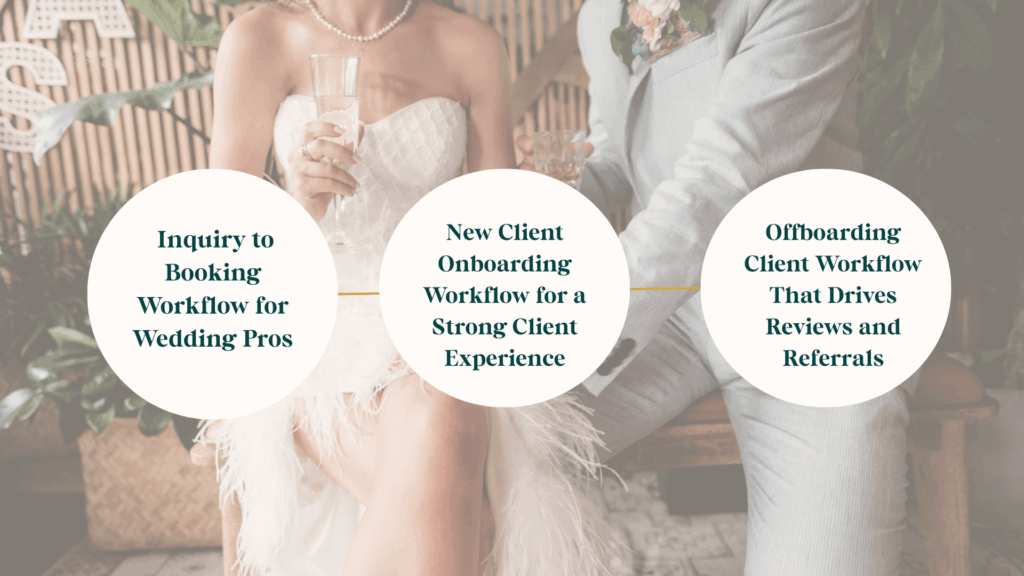
If your CRM feels overwhelming or ineffective, the problem usually isn’t the tool. It’s the missing crm workflow structure inside it. This guide walks you through the three workflows every wedding professional needs: inquiry to booking, new client onboarding, and offboarding client workflows. You’ll also learn why service-specific workflows are essential for protecting your client journey year-round.
Your CRM is not just a place where client information lives. It is the system that quietly runs your business behind the scenes. When workflows are missing or incomplete, it shows up everywhere. Leads go cold. Communication feels scattered. Your client experience becomes inconsistent, especially during the busy season.
Most wedding professionals assume their CRM (Customer Relationship Management) is broken or that they chose the wrong platform. In reality, the platform is rarely the issue. The real problem is that the workflows inside it were never built intentionally to support how your business actually operates.
A crm workflow connects one step to the next. It defines what happens after someone inquires, what happens after they book, and what happens when the project wraps up. Without workflows, your CRM becomes a digital filing cabinet instead of a system that actively supports your business.
What This Guide Will Help You Fix
In this blog you will learn how to identify and fix the most common CRM workflow gaps that hold wedding businesses back, including:
- Where leads are falling through the cracks during inquiry and booking
- Why your client journey feels inconsistent from one client to the next
- How missing onboarding steps create confusion and extra admin work
- Where offboarding is breaking down and costing you reviews and referrals
- Why different services require different workflows inside your CRM
- What to focus on first so your CRM starts supporting you immediately
Ultimately, this guide is designed to be your go-to resource for understanding how crm workflow design impacts your client experience and long-term growth.
The Hidden Issues Behind a Broken CRM
When workflows are missing or incomplete, your business relies on memory instead of systems. Because of this, follow-ups become inconsistent, onboarding feels rushed, and offboarding often feels abrupt or unfinished. Over time, this leads to unnecessary stress, confusion, and lost revenue. For example, this pattern shows up repeatedly in the 7 CRM mistakes wedding pros make.
In other words, the issue is not effort. Rather, it is structure. Without clear workflows, even the best CRM will feel heavy and frustrating.
CRM Workflow #1: Inquiry to Booking Workflow for Wedding Pros
First, your inquiry to booking workflow is the front door of your business. It is where first impressions are formed and where trust begins. When this CRM workflow is built correctly, your CRM handles the heavy lifting so you don’t have to chase leads manually.
In practice, this workflow should guide someone from curiosity about who you are to confidence that they are interested in working with you.
How Faster Responses Improve Your Client Journey
Most couples don’t inquire with just one vendor. They usually reach out to several professionals within a short window of time. That’s why response timing matters. A fast response isn’t about pressure. It’s about reassurance.
When your CRM sends an immediate response that feels organized and thoughtful, it signals that you’re prepared and reliable. As a result, it becomes easier for couples to move forward.
For a deeper look at this, review inquiry conversion tips for wedding pros.
Automated Yet Personal Follow-Up Workflows
Automation doesn’t have to feel cold or impersonal. A strong crm workflow can:
- Follow up when someone hasn’t responded
- Share your booking process clearly
- Offer scheduling links without endless back-and-forth
This is where systems start to give you breathing room. You can see this shift clearly in the consistent leads workflow shift.
Proposal, Contract, and Invoice Steps That Keep Bookings Moving
Once a couple is interested, momentum matters. When proposals or contracts are delayed, excitement fades quickly. Your workflow should guide clients step by step so nothing stalls or feels confusing.
Why This Workflow Increases Bookings Automatically
A well-built inquiry workflow answers questions before they’re asked and removes friction. That matters even more as inquiry behavior continues to change, as covered in Quidget’s blog, “Why contact forms are fading.”
CRM Workflow #2: New Client Onboarding Workflow for a Strong Client Experience
Once a client books, onboarding becomes the emotional anchor of the relationship. This is the moment where excitement either turns into confidence or uncertainty. A thoughtful onboarding workflow helps clients feel supported from the start.
The First Welcome Email and What Clients Need to Know
Your welcome email should clearly explain what happens next, how communication works, and what you need from the client. This clarity helps clients relax and know they’re in good hands.
If you’re evaluating tools that support onboarding well, explore the best CRMs for wedding creatives.
Intake Questionnaires and Gathering Key Details
New client onboarding is also about organization. Intake forms, questionnaires, and document uploads should live inside this workflow so details don’t get lost.
For best practices, review CRM onboarding guidance from Flowlu.
Setting Potental Client’s Expectations and First Tasks
Clients feel calmer when they know what to expect. Your onboarding workflow should outline timelines, responsibilities, and next steps clearly.
Additional insight can be found in Pixifi’s onboarding best practices.
Why Great Onboarding Builds Trust Early with Your Leads
When onboarding is smooth, communication improves and back-and-forth emails decrease. That early clarity sets the tone for a stronger client experience overall.
CRM Workflow #2: New Client Onboarding Workflow for a Strong Client Experience
Once a client books, your onboarding process sets the tone for the entire relationship. This is the moment when excitement either settles into confidence or starts to turn into uncertainty.
At this stage, clients are quietly asking themselves one big question: Did I make the right decision?
A clunky or unclear onboarding experience can trigger doubt, especially after a big financial commitment. On the other hand, a thoughtful, organized workflow immediately reassures them that they’re in good hands.
When onboarding is done well, clients feel supported, guided, and taken care of from day one. Instead of wondering what happens next, they know exactly what to expect.
Let’s walk through how to create a welcoming onboarding experience that builds trust and confidence right from the start.
The First Welcome Email and What Clients Need to Know
Your welcome email matters more than you might think. This is often the first real touchpoint after a client books, and it sets the tone for everything that follows. It is where clients start to understand you, your business, and how it feels to work together.
A strong welcome email should clearly outline what happens next, how communication works, and what you need from them right away. That kind of clarity helps clients relax. Instead of wondering what they should be doing, they feel confident knowing they are in good hands and that there is a clear process guiding them forward.
When your systems support this step well, onboarding feels seamless instead of scattered. If you are evaluating tools that make this easier, you can explore the best CRMs for wedding creatives and how they support a smooth onboarding experience.
Intake Questionnaires and Gathering Key Details
Client onboarding is not just about saying welcome. It is also where organization really matters.
Your intake questionnaires, forms, and document uploads should live inside your onboarding workflow so nothing slips through the cracks. Once a couple has booked you, this step becomes essential. The post-booking intake is where you translate a signed contract into a personalized, well-executed wedding day.
This is the moment your process shifts from selling a service to thoughtful planning and creative alignment. You are confirming timelines, preferences, logistics, and expectations so you can actually deliver what was promised. When this information is collected clearly and in one place, you can move forward with confidence instead of chasing details later.
A strong intake workflow keeps everyone on the same page and sets you up to deliver a smoother, more intentional client experience from the start. For more best practices around structuring this phase, you can review Flowlu’s CRM onboarding guidance.
Setting Expectations and First Tasks
Clients feel more at ease when they know exactly what to expect. Your onboarding workflow should clearly outline timelines, responsibilities, and the very first steps so nothing feels vague or rushed.
When expectations are set early, clients are not left guessing what happens next or what you need from them. Instead, they can move through the process with confidence, knowing there is a plan in place.
If you want additional perspective on structuring this phase, Pixifi shares helpful onboarding best practices focused on streamlining client intake with a CRM.
Why Great Onboarding Builds Trust Early
When onboarding runs smoothly, communication improves and unnecessary back-and-forth emails naturally decrease. That early clarity does more than save time. It builds trust.
By setting expectations and assigning clear first tasks, you create a calmer, more organized experience that sets the tone for a stronger client relationship from the very beginning.
CRM Workflow #3: Offboarding Client Workflow That Drives Reviews and Referrals
Offboarding often gets overlooked, but it is one of the most valuable workflows in your CRM. This is where you close the loop and protect your reputation long after the project ends. A strong offboarding process ensures clients leave feeling cared for, not abruptly finished with.
Delivering Final Files and Closing Tasks
For wedding professionals, offboarding should feel just as thoughtful as the planning phase. Couples should clearly know when final galleries, timelines, designs, or documents will be delivered and when the project is officially complete so nothing feels open-ended.
This step is especially important after the wedding day, when communication naturally slows down. A clear closing workflow helps you wrap up loose ends, confirm delivery, and internally mark the wedding as complete without relying on memory or manual follow-ups.
Final Payment Reminders That Do Not Feel Awkward
Automated reminders remove emotional friction and protect your time. Instead of sending manual nudges, your system handles it consistently and professionally.
When payment follow-ups are built into your workflow, clients see them as part of the process rather than a personal ask. If you use HoneyBook, it helps to stay updated on recent HoneyBook updates for wedding professionals and how they support automated offboarding.
Asking for Reviews the Right Way
Well-timed review requests make it easier for clients to leave feedback while the experience is still fresh. When requests are automated, they feel natural instead of forced.
This is also where wording and timing matter most. A thoughtful review request sent shortly after final delivery increases response rates and protects the quality of your online reputation.
Keeping the Relationship Warm After Services End
Thoughtful offboarding keeps the relationship open for referrals and future opportunities. A simple follow-up email or check-in reminds clients that the relationship does not end the moment the wedding does.
This final touchpoint is where long-term value is created. For a forward-looking perspective on what modern workflows should support, read what wedding planners need in a CRM as the industry continues to evolve.
If you want, next we can tighten this section with a short checklist or add a visual workflow summary that pairs well with this content.
Why Every Wedding Business Needs a CRM Workflow Ecosystem

The three workflows above are foundational, but they’re not enough on their own. Every service you offer has different milestones, timelines, and expectations.
The BODA Framework, which stands for Build, Optimize, Delegate, Achieve, is how those workflows are mapped intentionally so your CRM reflects how your business actually operates, not how software expects you to work.
Why One-Size-Fits-All Workflows Fail
Different services move differently. Trying to force everything into one workflow usually creates confusion for both you and your clients.
Service-Specific Workflows (What This Looks Like in Real Life)
Not every wedding business works the same way, and your CRM workflows should reflect that.
Photographers usually work in clear milestones, like booking, pre-wedding prep, gallery delivery, and wrap-up. Planners tend to work in phases that stretch over months, from onboarding to timeline building to wedding day execution. Venues have a different setup altogether, often managing contracts, payments, and vendor access across multiple events at once.
The goal is not to force one workflow to fit everyone, but to build systems that match how you actually work. If you are a venue professional, it can help to look at real-world examples of wedding venue CRM systems to see how others structure their processes.
How the BODA Framework Builds Workflow Architecture
Using the BODA Framework, workflows are built with clarity and intention:
- Build workflows based on how your service actually operates
- Optimize steps to remove friction and wasted time
- Delegate tasks to systems instead of memory
- Achieve consistency, scalability, and a stronger client experience
You can see this approach in action through Marketing Systems Services.
Bringing It All Together: Your CRM Is Only as Strong as Its Workflows
Your CRM isn’t meant to hold information. It’s meant to support you. When workflows align with your client journey, everything feels lighter and more manageable.
Next Steps for Improving Your CRM Workflow
If your CRM feels heavy right now, that doesn’t mean you failed. It means your workflows need attention. Start by noticing where things slow down or feel repetitive, because those moments usually point to the exact workflow that needs support. From there, focus on fixing one stage at a time instead of trying to overhaul everything at once. Small, intentional changes to your CRM workflow can create immediate relief and make your system feel usable again.
CRM Setup for Wedding Pros Who Want a System Built Right
This is for wedding pros who want a CRM built correctly from the ground up, with inquiry, onboarding, and offboarding workflows connected from day one. Instead of patching things together, we design a crm workflow that matches how you actually work and how your clients move through your process. The result is a system that feels clear, supportive, and easy to maintain as your business grows.
Learn more about CRM setup for wedding professionals.
CRM Refresh to Clean Up and Fix Workflow Gaps
If your CRM feels messy, overwhelming, or outdated, a refresh focuses on cleaning up workflows and fixing the gaps that are slowing you down. This option is ideal if your business has evolved but your CRM hasn’t kept up. Together, we realign your crm workflow so it supports how your business runs today, not how it looked a year or two ago.
Explore a CRM refresh for wedding businesses.
Scalable Systems Setup for Growing Wedding Businesses
For established businesses that are booking more clients and feeling the strain behind the scenes, this option focuses on building workflows that scale. We create systems that reduce manual work, support higher volume, and protect the client experience as demand increases. This is about growth without burnout and consistency without chaos.
See how scalable systems for wedding pros work.
Marketing HQ Setup to Connect CRM and Visibility Systems
Your CRM should not live in isolation. Marketing HQ Setup connects your crm workflow to your marketing, content, and lead tracking so everything works together instead of separately. This gives you clearer visibility into what’s working, where leads are coming from, and how your marketing supports your client journey.
Learn more about Marketing HQ setup for wedding professionals.
Marketing Health Check to Identify CRM Workflow Issues
If you’re not sure where the breakdown is, this is the best place to start. A Marketing Health Check identifies which crm workflow pieces are missing, misaligned, or creating friction so you know exactly what to fix first. It’s a low-pressure way to get clarity before committing to a full build or refresh.
Start with a Marketing Health Check for your CRM workflows.
Q&A: Common CRM Workflow Questions Wedding Pros Ask
This should all happen through one connected inquiry to booking workflow. After the initial response, your CRM should naturally guide the lead through follow-ups, scheduling, proposal delivery, contract signing, and payment. When this process is built correctly, bookings move forward without you chasing every step or double-checking what’s been sent.
Yes, if you’re handling multiple inquiries, contracts, and payments at once, a CRM makes a big difference. A CRM allows your booking workflow to run consistently, even during busy season, without everything living in your head.
A strong offboarding client workflow includes final deliverables, payment confirmation, review requests, and referral prompts sent at the right time. This keeps the relationship warm and makes it easier for happy clients to support your business after the event is over.
Because not every service works the same way. A full-planning client moves through very different phases than a photographer, venue, or florist client. Different workflows allow your CRM to support each service properly instead of forcing everything into one generic process.
Look for the moments that feel stressful or repetitive. Missed follow-ups, last-minute scrambles, or clients asking the same questions over and over are usually signs that a workflow is missing or incomplete.
In most cases, yes. Most wedding pros don’t need a brand-new CRM. They need better workflow design inside the system they already use. Fixing workflows is often faster and more effective than starting over on a new platform.
Key Takeaways for Building a Better CRM Workflow
- A crm workflow is what actually runs your business, not the software
- Inquiry, new client onboarding, and offboarding client workflows are essential
- Service-specific workflows protect your client experience
- Strong workflows reduce stress and increase revenue
- You don’t need a new CRM, you need better workflows


