8 Marketing Tools to Build Your Marketing Ecosystem
TL;DR: The right Marketing Tools should work together, not create more work. Build a connected ecosystem that turns visibility into inquiries.

Collecting marketing tools is easy. New ones pop up every year, and each one promises to be the answer.
But here’s what I see over and over in the marketing audits I do with clients. Most business owners end up with 3 to 6 tools doing the same job. They have two CRMs, but neither is fully set up. They pay for a scheduling tool, then forget about it and start using a second one. Their content ideas live in five different places: a phone, a notebook, a Google Doc, and even a napkin.
That’s a lot of money spent on tools that overlap instead of work together.
A connected system fixes this. So in this post, I’ll walk you through what a marketing ecosystem actually is. Then I’ll share the 8 tools I recommend to build one, and how they connect.
What Is a Marketing Ecosystem?
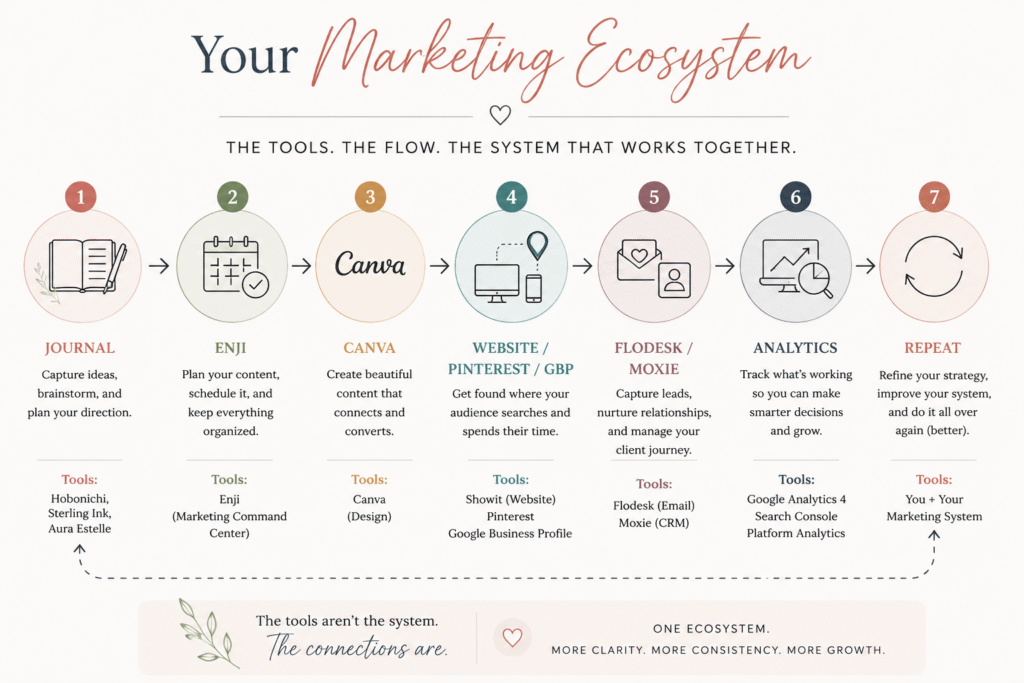
Think of a marketing ecosystem as all your marketing pieces working as one team, instead of separate parts.
Mailchimp describes it as the collection of channels, technologies, tactics, and teams you use to run your marketing. In plain terms, it’s every tool and channel you use to get your message in front of the right people.
When those pieces are connected, they share one goal: helping your business get found, and turning that visibility into inquiries.
Having one command center, instead of ten scattered tools, is a core part of this system.
The Marketing Tool Roadmap
Before we get into the individual tools, let’s zoom out. A marketing tool roadmap is your big-picture plan for which tools you use, and when. If you’d rather have someone map this out for you, that’s exactly what my marketing systems services are built to do.
Here’s the roadmap I use with clients:
Get Found → Get Them Interested → Capture the Lead → Nurture the Relationship → Book the Client → Measure What’s Working → Improve the System
This roadmap helps me figure out exactly which tools a business needs at each stage. Once you see the roadmap, the tools below will make a lot more sense.
A marketing system isn’t about finding one platform that does everything. It’s about deciding what needs to happen at each stage of your marketing, then choosing tools that support those steps. That’s the difference between collecting tools and actually systemizing your business.
As a systems strategist, this is the piece I spend most of my time on with clients: not adding another tool, but building the marketing operations that connect the tools you already have into one centralized marketing system.
These are eight parts of a marketing ecosystem, not eight subscriptions you need to buy. Some of the categories below include more than one tool because they solve different parts of the same marketing job.
Your Website: The Foundation of Your Marketing Ecosystem
Recommended tool: Showit
.There are plenty of good website platforms out there. However, for service providers, authors, bookstores, and creative entrepreneurs, Showit stands out.
Why? You get full visual control without giving up the backend features your marketing needs.
Instead of being locked into rigid rows and columns like some website builders, Showit works more like Canva or Adobe Illustrator. You can place text, images, shapes, and other elements exactly where you want them.
You can also design your desktop and mobile sites separately. That means your mobile visitors get a layout designed specifically for smaller screens instead of a squeezed-down version of your desktop site.
How Authors Can Use Showit as a Marketing Tool
Authors can use Showit to build a personal brand around their books and create a home for their work beyond social media.
You can use your site to:
- Create immersive landing pages for new releases
- Showcase book mockups and photography
- Build a media kit for press opportunities
- Publish essays, articles, and other long-form content
- Create search-friendly content through the WordPress blog
This gives authors a place to build an audience through search while keeping their visual brand consistent.
How Independent Bookstores and Cafes Can Use Showit
For a brick-and-mortar business, your website has one big job: help people decide to visit you.
Showit can help you showcase the personality of your physical space through:
- Photo galleries
- Video
- Event pages
- Book signing landing pages
- Book club information
- RSVP and ticketing links
You can also connect event pages to tools like Eventbrite so visitors can take the next step without creating a complicated website experience.
One important consideration: If you sell a large catalog of books online, Showit isn’t designed to manage extensive ecommerce inventory on its own.
A simple approach is to use Showit as your main website for your brand and physical location, then link customers to Bookshop.org for online book sales or add a small Shopify integration for a curated selection.
For cafes, mobile experience matters even more because most of your traffic comes from mobile phones. Your website should make it easy for someone to quickly find your menu, hours, location, events, and how to visit you.
How it connects: Your website is the destination. Google, Pinterest, social media, and your other marketing channels help people find it, while your CRM and email marketing tools help turn that attention into relationships and inquiries.
Your Visibility Tools: Help People Find You
Recommended tools: Google Business Profile, Ubersuggest, Google Search Console
Google Business Profile
For local businesses, Google Business Profile can be one of your most valuable visibility tools. When someone searches for a business nearby, Google can show your profile before website links.
Your profile can help potential customers:
- Call or message you
- Get directions
- Check your hours
- View photos
- Read reviews and your responses
- View your menu
- Book an appointment
It also contributes to how your business information appears across search, including the signals that help AI search find your business.
Want to make sure you’re using your profile well? I created a free Google Business Profile Checklist with often-overlooked features that can help customers and search engines better understand your business.
Why Authors Should Be Careful With Google Business Profile
Google Business Profile is designed for businesses that have face-to-face contact with customers, either at a physical location or within a defined service area.
For many authors, that means a profile may not be the right fit.
If you’re an online-only or fiction author:
- You likely won’t meet Google’s eligibility requirements.
- Don’t list your home as a public storefront.
- If you’re eligible as a service-area business, clear your physical address and use the service-area setting instead.
Some authors may have a Google Knowledge Panel, but this is different from a Google Business Profile. Google generates Knowledge Panels automatically based on information it finds across the web, so you can’t simply create one yourself.
If you offer local, in-person services, such as consulting or workshops, you may be eligible for a Google Business Profile. Use the service-area setting if you don’t want your home address displayed..
Ubersuggest
Tools like Semrush and Ahrefs are built for technical SEO agencies, with pricing to match. Ubersuggest takes the same kind of data and makes it accessible for small businesses and bootstrapped founders.
You can plug in a competitor’s website and see their top-performing pages, the keywords sending them traffic, and their backlink profile. It’s a solid tool for traditional Google search data, though it doesn’t track how generative AI tools like ChatGPT, Gemini, Claude, or Perplexity find and reference local brands. If you want to see how those AI search tools actually find local brands, I break that down in a separate post.
Google Search Console
This is one of my favorite tools, and it’s completely free. Google Search Console shows you exactly how your site performs in search results, and flags anything that’s broken.
For authors, it reveals the exact search terms people use to find you, like specific book titles or character names. When you publish something new, like a press kit or blog post, you can submit the URL directly so Google indexes it faster. It also shows a partial sample of sites linking back to yours, though it’s not a full backlink tracker. For a complete picture of who’s linking to your site, a dedicated tool like Ahrefs or Semrush works better.
For independent bookstores, it shows whether local readers are finding you through general searches, like “indie bookstore nearby,” or specific ones, like “buy graphic novels” plus your city. It also flags event pages that aren’t showing up in search, so you can fix the issue quickly.
For stationery shops, Search Console shows which product pages get a lot of views but very few clicks. If your “handcrafted leather journals” page gets 1,000 impressions but only 5 clicks, that’s a sign to rewrite the title and description.
How it connects: People search for something. That search leads to research. Research leads to content. Content leads them to your website, where they finally discover you.
Your Visual Content Tool: Turn Ideas Into Marketing
Recommended tool: Canva
Canva is a simple, browser-based design tool built for people who aren’t designers. Instead of learning complex software like Photoshop, you get drag-and-drop templates, plus a Brand Kit that stores your fonts, logo, and colors in one place.
For a small business on a budget, Canva works like a design team you don’t have to hire.
How Different Businesses Use Canva
- Authors can design 3D book cover mockups, “out now” graphics, and short video teasers for social media. It’s also useful for building press kits, author bio sheets, and bookmarks to hand out at events.
- Independent bookstores can print “staff pick” shelf cards, event posters, and window displays, right through Canva’s print feature. It’s also great for designing monthly reading club graphics and email newsletter headers.
- Cafes can design printed menus, digital menu boards for TVs, and table tent cards with QR codes linking to online ordering or Wi-Fi. Canva also works well for seasonal drink promotions and loyalty cards.
- Stationery shops can prototype greeting cards, planner pages, and sticker sheets using exact print dimensions. It’s also useful for packaging design, like thank-you inserts and branded tissue paper.
One thing to remember: Canva creates the assets, but it doesn’t tell you what to post or when. That job belongs to a different tool in your system.
How it connects: Your strategy leads to a content idea. That idea becomes a Canva design. That design goes out on your marketing platform.
Your Marketing Planner and Content Management Tool
Recommended tool: Enji
Affiliate disclosure: Enji is an affiliate partner of Boda Bliss. If you sign up through my link, I may earn a small commission at no extra cost to you. I only recommend tools I actually use and trust.
Out of everything on this list, Enji is the tool I’d call your marketing command center. It’s a marketing hub built for small business owners who don’t have a marketing team. Instead of juggling a social media scheduler, a separate writing tool, and a messy spreadsheet calendar, Enji brings strategy, writing, and scheduling into one place.
That’s the whole point of a command center: one dashboard, instead of five disconnected tabs. You’ll find more tools like this in my free resource library if you want to keep exploring.
Enji’s Core Features
Enji learns your writing style from past examples, then generates captions, emails, and blog drafts in your actual voice, not generic AI text. Its campaign builder lets you pick a goal, like launching a product, and it creates a step-by-step checklist for you to follow.
You can also connect Instagram, Facebook, and LinkedIn to schedule posts directly. On top of that, it tracks your key numbers, like website traffic and email growth, in one simple dashboard.
How Different Businesses Use Enji
In short, Canva helps you create the content. Enji helps you manage what happens to it next.
- Authors can map out a full 6-week launch plan for a new book with the campaign builder. You can also batch and schedule writing updates and quote graphics ahead of time, so you can focus on writing instead of posting.
- Independent bookstores can build a complete marketing plan for an author signing, including emails, social posts, and press releases, all written in your store’s voice. You can also plan content months ahead for events like Independent Bookstore Day.
- Cafes can coordinate a new seasonal menu launch across social media and email at the same time. The AI can also write captions for your daily pastry photos, so your staff doesn’t have to think of something on the spot.
- Stationery shops can map out Black Friday and back-to-school promotions well in advance. You can also schedule ongoing posts that explain your materials and craftsmanship to customers.
How it connects: Your marketing strategy flows into Enji. Enji connects to Canva for design. From there, it goes to social media or Pinterest, and finally to your website.
Your Email Marketing Tool: Stay Connected Before They’re Ready to Book
Recommended tool: Flodesk
Flodesk is an email marketing and checkout tool built for small businesses that care about visual design. It uses a block-based editor, similar to Canva, so it’s easy to build beautiful emails without any design experience. If you want a deeper look at building this out, I cover it in Email Marketing for Small Business.
One standout feature is the flat-rate pricing. You pay the same fee whether you have 100 subscribers or 100,000. You can also build simple automated sequences, like a welcome series or a free lead magnet delivery, without extra software.
Flodesk Checkout lets you build sales pages and collect payments through Stripe, so you can sell digital products without a full e-commerce setup.
How Different Businesses Use Flodesk
.
- Authors can nurture their reader list with newsletters, automatically deliver a free reader magnet, and sell digital novellas directly through Flodesk Checkout.
- Independent bookstores can send weekly newsletters featuring staff picks, new arrivals, and automatic reminders for upcoming book clubs.
- Cafes can collect emails through a pop-up form and send VIP invitations for seasonal tastings or loyalty perks.
- Stationery shops can showcase new product releases with image-heavy emails, and deliver instant digital downloads like printable art
How it connects: A website visitor downloads a lead magnet. That email address joins your list. You nurture that relationship until it turns into an inquiry.
Your CRM: Turn Inquiries Into a Client Journey
Recommended tool: Moxie
Moxie, formerly known as Hectic, is an all-in-one business management and CRM tool built for freelancers and independent service providers.
It combines client tracking with invoicing, project management, and time tracking, all in one workspace. Moxie’s own breakdown of its plans is a helpful place to compare features if you’re deciding which tier fits.
Who This Tool Fits Best
- Authors offering freelance writing, ghostwriting, editing, or coaching services are a great fit. Moxie can manage client agreements, retainer billing, and manuscript deadlines.
- Stationery shops doing custom, high-touch work, like custom wedding invitation suites, are also a great fit. Moxie handles proposals, client proof approvals, and deposit invoices smoothly.
- Independent bookstores and cafes are a poor fit for daily retail sales
That kind of business relies on point-of-sale inventory systems, like Square or Toast, instead of a client CRM. However, if a bookstore manages event venue rentals or bulk corporate book orders, Moxie can help send contracts and invoices for that work.
How it connects: Marketing brings in an inquiry. That inquiry moves into your CRM. From there, it becomes client onboarding, and eventually, a booking.
Your Marketing Analytics Tools: Know What’s Actually Working
Recommended tools: Google Analytics, Google Search Console, platform analytics
Google Analytics, or GA4, is a free tool that tracks how visitors find, browse, and interact with your website. While Search Console shows what happens before someone clicks your site, Analytics shows what happens after they arrive.
It turns your raw website traffic into real insight. You can see which marketing channels actually bring in revenue, which pages people spend time on, and where they leave without taking action.
How Different Businesses Use Analytics
- Authors can track exactly how many visitors click through to Amazon or a local bookstore to buy their book. You can also see whether readers come for your blog, your press kit, or your event announcements, and double down on what’s working. It also helps you see whether sign-ups come from Instagram, a podcast, or organic search.
- Independent bookstores can track drop-off rates on event pages, comparing how many people visit versus how many actually register. You can also see whether your visitors are local shoppers or online browsers.
- Cafes can monitor how many mobile visitors check the menu or hours before showing up in person. You can also measure how much traffic clicks through to your online ordering system.
- Stationery shops can pinpoint exactly where customers drop off during checkout, from product page to cart to purchase. You can also see which seasonal gift guides drive the most sales.
How it connects: You measure results. You learn what worked. You adjust your approach. Then you repeat the process.
Your Analog Marketing Tool: A Marketing Journal
Not every part of your marketing system needs to be digital. Paper planners give your ideas room to breathe, before they become a finished blog post or email. This kind of analog shift in small business marketing is something more creative business owners are leaning into, and it fits naturally into a bigger system.
Analog Tools: Hobonichi and Sterling Ink
These tools are best for quick, low-pressure brainstorming. The Hobonichi Techo planner, known for its smooth paper and daily grids, works well for jotting down real questions your clients or customers ask you.
You can also map out a launch timeline across a weekly spread, and get a feel for its pacing without any notification distractions.
Sterling Ink, a minimalist planner, works well for mapping out quarterly themes before you touch a digital calendar. It’s also a good place to reflect honestly on what worked, like noticing your in-person book club felt genuine, while a promo video felt forced.
How These Tools Work Together, Stage by Stage
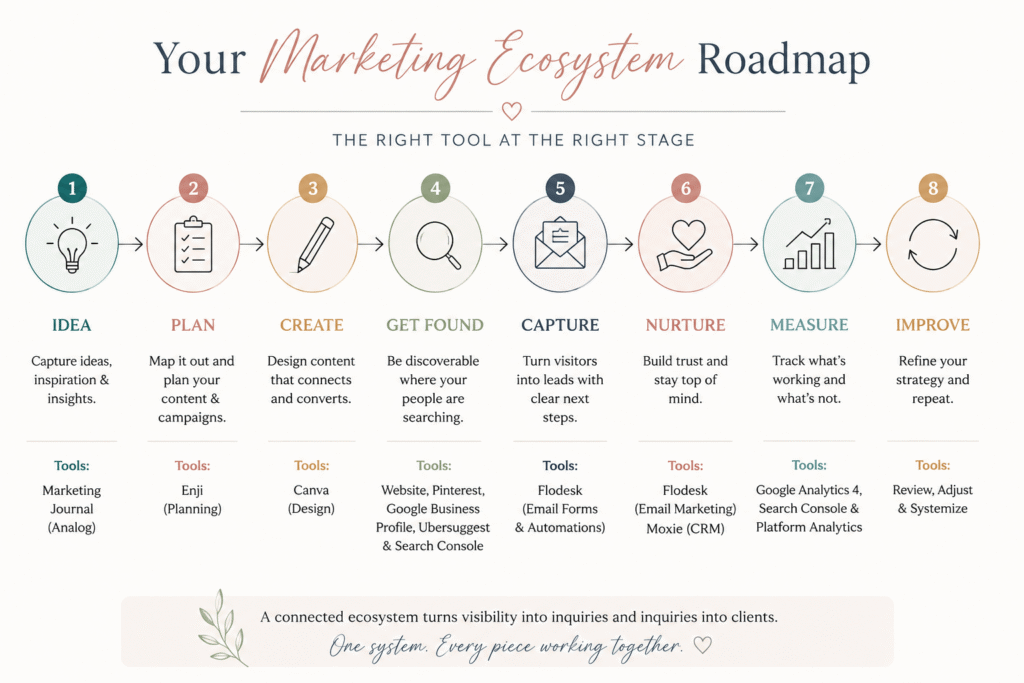
Here’s how everything fits into one connected system.
- Stage 1: Strategy and Ideas. In your Hobonichi or Sterling Ink, you jot down client questions, campaign ideas, and honest reflections. This is where your marketing starts, before anything goes digital.
- Stage 2: Production and Planning. In Ubersuggest, you research the keywords your customers are actually searching for. In Canva, you design the visuals for your campaign. In Enji, you turn that plan into AI-written copy in your voice, then schedule it.
- Stage 3: Visibility. Your Showit website displays your landing pages, blog, and brand experience. Your Google Business Profile drives local foot traffic straight to your door or website.
- Stage 4: Conversion. Flodesk captures email leads from your website and delivers your lead magnet automatically. Moxie manages your client pipeline, from proposal to contract to invoice.
- Stage 5: Optimization. Google Search Console flags technical issues and shows which search terms bring people to you. Google Analytics shows what visitors actually do once they land on your site.
When each of these tools talks to the next one, your marketing stops feeling scattered. Instead, it becomes one system that consistently turns visibility into inquiries.
That’s really the whole job of a marketing ecosystem. Not more tools, and not more content. Just a clear system where each piece knows what it’s supposed to do, and when.
If you’re not sure where your own marketing ecosystem is breaking down, my Marketing Systems Audit is designed to find the gaps, overlaps, and disconnected pieces so you know what to fix first.
Frequently Asked Questions About Marketing Tools
Marketing tools are platforms or resources that help you plan, create, manage, distribute, and measure your marketing. The goal isn’t to use as many tools as possible, but to choose the right ones for your business.
Most wedding professionals can start with a website, Google Business Profile if eligible, a CRM, a marketing planner, a content creation tool like Canva, and an email marketing tool. Your needs can grow as your marketing ecosystem grows.
Start with what your marketing needs to accomplish, then choose tools that support those tasks. Look for tools that work well together instead of adding another platform every time you have a problem.
A marketing ecosystem is the combination of your marketing tools, processes, content, and customer touchpoints working together. It creates a connected path from being discovered to becoming a client or customer.
Start by mapping your marketing process from idea to results. Identify what needs to happen at each stage, assign each task to the right tool or process, and create repeatable workflows so your marketing doesn’t depend on remembering everything.
No. The eight tools in this guide represent different parts of a marketing ecosystem, not eight subscriptions everyone needs. Start with the tools that solve your biggest marketing gaps and build from there.
Cinthia Onines is the founder of Boda Bliss and a Marketing Systems Architect who helps creative businesses and wedding professionals build marketing systems that support long-term visibility and growth. She specializes in marketing operations, AI Search Optimization, content systems, and workflow strategy, helping business owners create connected marketing that works for both people and AI.
Drawing on her background in the wedding industry and years of experience designing marketing systems, Cinthia translates complex marketing and AI concepts into practical strategies that business owners can confidently implement.
When she’s not mapping marketing systems or researching the latest AI search trends, you’ll usually find her reading historical fiction, visiting independent bookstores, or enjoying a quiet afternoon with coffee and her notebook.


